



I’ve built a few AI agents over the past few months. One of the first and more complex ones has been an AI agent that identifies interesting new jobs for me. The journey of building this particular agent helped me incredibly, through learning by doing, to really understand how AI agents are structured, how they work, and where the pitfalls lie.
In a nutshell, an AI agent is often nothing more than an automatically running workflow based on interconnected activity modules (or “nodes”), some of them being AI models. For example, in my case, an OpenAI model integrated into the agent’s workflow analyzes job emails and postings, filters for interesting positions, and extracts relevant information. Most other modules/nodes are standard, non-AI functions like pulling emails and RSS feeds, doing deterministic prefiltering based on keywords in job titles or locations, or saving the agent’s output to an Airtable database for my review.
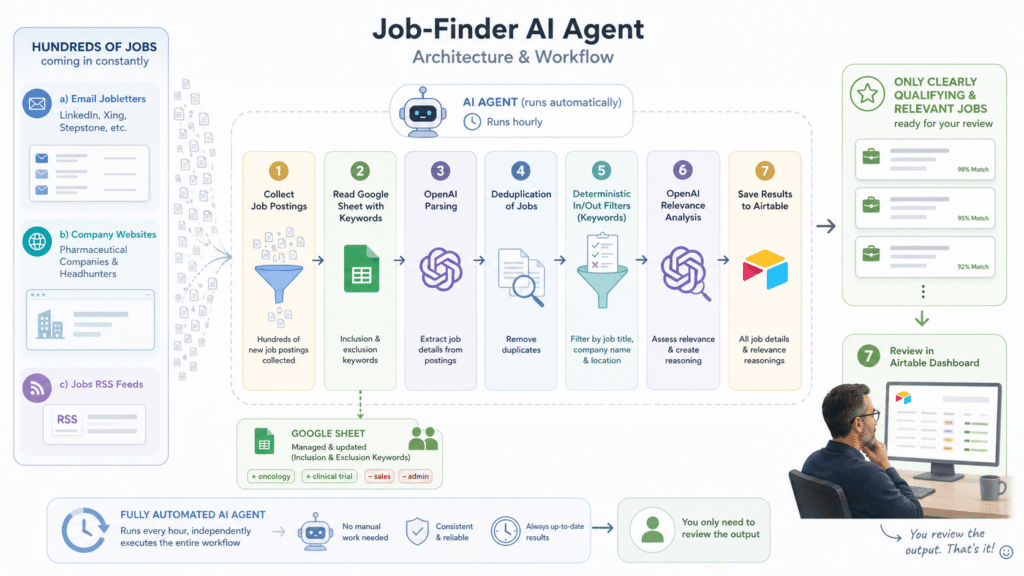
I built my Job-Finder AI agent manually, but guided by different AI chatbots. Later, I experienced that these same basic principles and pitfalls matter when you use an AI (such as Claude Code) to actually let it build the agent. I am not going to share an AI-generated list of common challenges now, but rather what I have personally learned in real life. So, here are …
My 8 most important lessons learned when building my first AI agent …
Overview:
- Learning #1: You need to have a good understanding yourself
- Learning #2: Specific asks will give more significant and targeted AI results
- Learning #3: Keep it as lean and simple as possible
- Learning #4: Design first, build second
- Learning #5: Actively manage costs
- Learning #6: Always challenge the AI
- Learning #7: An AI agent is no magic but just a workflow with connected activities
- Rely on ‘collective intelligence’
Learning #1: You need to have a good understanding yourself
This is the most important, most critical, if not even absolutely vital, success factor. We’ll see more about why as we continue through the article.
In general, when asking an AI to help you build an AI agent, the worst thing you can do is be vague and just let the AI do something.
This … will … go … wrong!
It will waste your time. It will waste your money. It will frustrate you.
You need to have ….
- Clarity on output: a precise understanding of what you want to achieve and what the agent’s output is expected to look like
- Clarity on dos and don’ts: a well-thought-out understanding of what the agent is expected to do … but also what the agent is not expected to do (healthcare professionals may feel reminded of inclusion and exclusion criteria with clinical trials)
- Clarity on components: at least a basic understanding of the tools, systems, and services that are used as components of the AI agent, that feed data into it, or that receive the agent’s output
It is crucial that you know exactly what you want to achieve.
This is about the AI getting clear guidance on what it is expected to deliver. But this is also about you being able …
- to judge whether the AI agent architecture is creating the output you desire,
- to judge whether the AI is using a component efficiently and effectively,
- to recognize whether the AI might fool around (and this will happen sooner or later),
- to follow what is going on.
Finally, you will have to judge whether the AI produced an agent that does the job effectively and efficiently. Your time invested, your money invested, your results. Always keep in mind:
an AI cannot compensate for your lack of understanding or find effective solutions based on your uncertainties.
Learning #2: Specific asks will give more significant and targeted AI results
You can either ask the AI …
Please build some kind of AI agent for me that is giving me jobs I could be interested in.… or you can ask …
Help me with building an AI agent which is identifying jobs for me in email job letters, job RSS feeds and on the list of websites (attached). I want to have a browser-based review dashboard of all jobs identified, which I can check every day for jobs interesting to me.

Relevant jobs are meeting the following criteria:
- industries: pharmaceuticals, biotech [...]
- job location: USA, Switzerland or Remote
- EXCLUDE jobs with ith any of the following words in job title: Sales, Field, HEOR, [...]
- INCLUDE jobs with any of the following words in job title: medical, customer, experience, omnichannel, digital, [...]
- INCLUDE jobs relating to any of the following areas based on OpenAI analysis of the jop posting: customer experience, patient experience, omnichannel, rare disease, [...]
- [...]
Now, which one do you think is better? The second version helps the AI much better “understand” what you want to achieve, what the agent is expected to do, and what the agent’s output needs to be. Which brings us right back to Learning #1, since it naturally requires you to understand and know it yourself.
Be as specific as possible … without being overly specific. Being specific enables the AI to propose a solution that I will do a decent job. Being overly specific might accidentally set guardrails that prevent the AI from finding the best solution. It is a balance. Your north star can be the question, “Does this detail help the AI agent to deliver more relevant and meaningful results … or not?“
Be as specific as possible regarding the AI agent’s output,
and as vague as possible regarding the AI agent’s architecture.
Learning #3: Keep it as lean and simple as possible
Make sure your request isn’t too complex for the AI. Ask yourself what the critical delivery expected by the planned agent is. And what would be additionally nice to have. Then build a productive version of the first, and add features of the latter later. This might be my best advice to save time and money.
Honestly speaking, looking back, I think the Job-Finder AI agent wasn’t the smartest choice to start with. While working on it, it turned out to be quite complex, especially in the details. Many different components had to connect to ensure consistent data end-to-end. So, I would generally recommend starting with something simple.
Repeatedly check what the AI has understood against what you expect.
In addition, it might generally be a good idea to always ask the AI that is supporting you with building the agent what it has understood. Which – again – nicely refers back to Learning #1.
Example prompt to check the AI’s “understanding”:
Please summarize what I expect from you and what you plan to do.Another tactic that has been shown to make things smoother is to build an agent not all at once, but step by step, iteratively, moving from one partial result to the next.
Build more complex AI agents not all at once, but step by step, iteratively.
Learning #4: Design first, build second
What definitely helps with Learning #3 is designing the AI agent’s concept and architecture before actually building it. You can either advise your supporting AI to consider this (see example prompts below), or – more professional but also a bit more sophisticated – specify structured phases in the prompt instructions, where an explicit design & architecture phase is defined.
However, do not allow your AI to run into realization before it has well “understood” what precisely the agent needs to do, what concrete output is expected from the agent, and what the smartest and most efficient way to build it is. Which certainly means that you also need to have well understood yourself, which is why I would like to kindly refer back to Learning #1.
Don’t let your AI start building before it has thoroughly “understood” the activity.
Example of a single-line prompt
Before building, configuring, or executing anything, work with me to clarify the AI agent’s requirements and collaboratively design its architecture, explain assumptions, reasoning, trade-offs and what argues against your recommendation, ask targeted questions where needed, check for contradictions, and wait for my explicit approval before implementation.Example of a structured co-working prompt
[...] Work with me in two phases:

PHASE 1 — DISCOVERY AND DESIGN
1. Restate my goal and identify the intended users, environment, constraints, and success criteria.
2. Propose an agent architecture, including its responsibilities, workflow, required tools and data, human-approval points, failure handling, security and privacy considerations, and evaluation criteria.
3. Present a suggested design for my review. Do not write implementation code, create or modify files, configure integrations, call external tools, or run anything during this phase.

PHASE 2 — IMPLEMENTATION
Begin only after I explicitly approve the design and ask you to proceed [...]
Learning #5: Actively manage costs
OK, to be very clear and avoid any accidental misunderstanding:
If your prompt asks the AI to find a cost-effective solution with minimal fees, this does NOT mean that you get the most cost-effective solution with the lowest possible fees.
“Cost-effective” is relative. But even when I tried to nail it down further with my prompt, the AI still wasted money. This is not the place to discuss the ‘how?’ and ‘why?’. But you should know that and keep it in mind.
I am afraid to say you will have to use your own brain to land on the most cost-effective AI agent workflow. Kindly consider these aspects, please:
- Costs = fees for the agent’s platform (enabling it to run automatically) + fees for tools used as components + fees for tokens processed by any AI components within the agent’s workflow + possibly data feeding the agent
- Interestingly, in my case, costs are driven less by the integrated AI model (OpenAI API), which I assumed would become the main cost driver. But I was smart enough to a) choose an OpenAI model version that offers great value for the price and isn’t oversized for its specific use, b) choose effective model parameters, and c) combine activities into 2 tasks for the model only (instead of many specific, separate tasks).
- In my case, costs were more dependent on the agent’s workflow platform and tool components used. E.g., the first agent versions were built with Make.com. But Make.com charges based on processed items, and this can scale up very quickly and easily.
- Preselecting data and early deduplication help to keep load and costs lower. In my example, I have a) a preselection of jobs before they enter the agent, b) a deduplication of jobs coming from different sources very early in the workflow, and c) a purely deterministic pre-filtering process before data reaches the OpenAI modules.
All of that – yet another time -refers back to Learning #1 – You need to have a good understanding yourself – which more and more evidently becomes the foundation for success with building an effective and efficient AI agent.
Learning #6: Always challenge the AI
The need to challenge the AI comes from three critical observations:
1. If you think something is error-free just because an AI built it, that’s a fallacy. Today, as a general rule, I let the AI check its product with every major interim version. And in 8 or 9 out of 10 cases, the AI finds something that still needs to be fixed.
Please review the workflow end-to-end for errors and inconsistencies.2. If you think that an AI always uses component tools purposefully and in the best possible way, that’s a fallacy. I have dozens of anecdotes where the co-building AI specified a particular procedure using a tool component in great detail… but when I challenged it, the tool turned out to be used completely incorrectly, didn’t provide the assumed functionality, or wasn’t needed at all.
Please check all components and tools in this workflow for being used according to their tool descriptions and specifications; prioritize information in official tool documentation; identify potential tool misuse and assumed features that are not documented.3. If you think something is built lean just because an AI built it, that’s a fallacy. It does not seem to be an AI’s nature to be efficient and pragmatic. But I have repeatedly observed different AIs making things considerably more complex than required, even when my prompt explicitly asked to keep it simple and lean. The question might be whether that really matters? Well, it does, because every additional step increases the risk of errors, and in some cases unnecessary components can add unnecessary costs.
While working on the agent:
Do not apply any changes, but first briefly tell me what you propose to adjust to make the workflow more lean and simple with a short explanation and pros/cons.A check with major interim versions:
Please review the workflow from start to finish for redundancies, unnecessary steps, and superfluous activities.So, challenging the AI and its output helps me avoid wasting time on a wrong solution and considerable costs for tool fees and processing tokens. And you are probably expecting it already: being able to challenge is certainly based on Learning #1.
Regularly challenging the AI’s output saves time, reduces costs, and makes the agent more robust.
There actually is a ‘magic step’ that I am using more and more. I ask my co-building AI partner to intentionally take an opposite perspective. So I force the AI to contradict itself. This can be truly eye-opening, trust me. Sometimes, only minor aspects come to light. Sometimes, a completely new, much more efficient or pragmatic proposal emerges.
Take the opposing position deliberately: argue from the perspective of a knowledgeable person who disagrees with your proposal. Present the strongest counterarguments, identify potential weaknesses, and explain under which conditions the opposing view would be more convincing.Asking the AI to contradict itself can be eye-opening.
Last but not least, I started to use some ‘master rules’ which help to avoid some of the troubles early on.
General rules:
- State your assumptions.
- Ask follow-up questions if information is missing. Actively ask for missing information if it is necessary for a precise answer.
- Never speculate. Base your answers solely on verified facts. Clearly state when information is missing, uncertain, or unverifiable.
- Check your answer for contradictions.
- Justify your choice, but keep it brief.
Learning #7: An AI agent is no magic but just a workflow with connected activities
Everybody can build an AI agent. It is not rocket science. I can. You can. It is just a bit of an investment of time to try and learn by doing.
And I dare to predict that, in the foreseeable future and for most of us, setting up AI agents will become a completely normal part of our daily routine. Like managing a spreadsheet or writing an email once was a totally new thing to do.
So, the earlier you start building your first own agent, the faster you get up to speed.
More a proof than a learning: Rely on ‘collective intelligence’
A couple of months ago, I wouldn’t have been able to build an AI agent from scratch without any support. My AI partner enabled me and guided me. Vice versa, the AI needed my guidance, my decisions, my judgments, my feedback, and my corrections to produce something really effective and value-creating.
The most powerful approach is human and AI working a partners hand in hand.
This has driven home in real life what I learned at the end of 2025. That the real power is in the ‘collective intelligence‘ concept of humans and AI working hand in hand. Plus, it can be really fun.
Disclaimer: This article was written by a human. I only used AI tools to check spelling, grammar, and to improve the wording.
